Introducing POSCafe integration: browse and order food and drink on screen
.jpg)
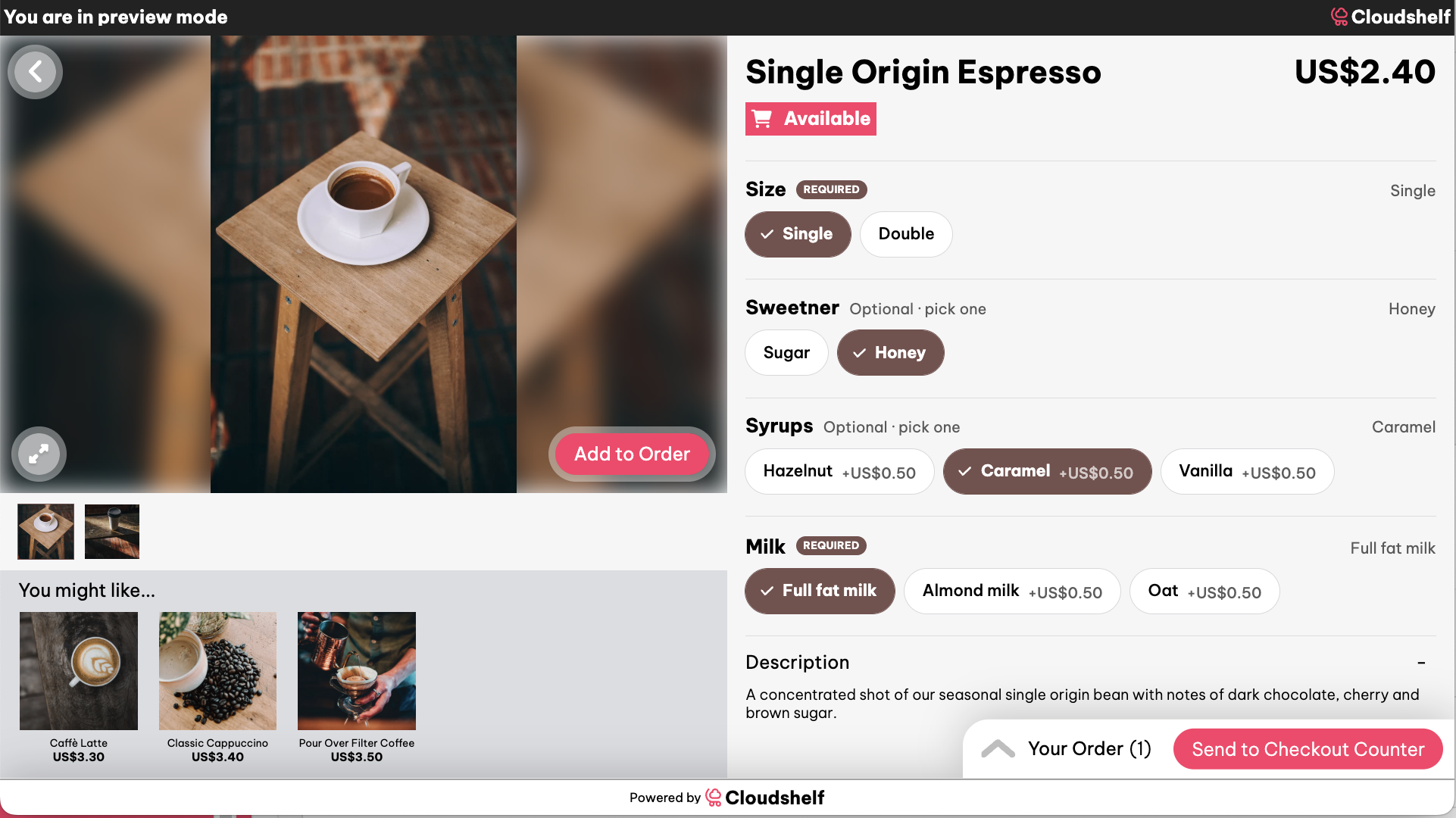
Cafes and food service counters run on choice. A single cappuccino can mean a decision on size, milk, strength, and syrup before the order is even complete, and taking that many choices verbally at a till slows every queue behind it. With our partnership with POSCafe, Cloudshelf now supports POSCafe modifiers directly on screen, so customers can browse the menu and build their order themselves, in their own time.
How our POSCafe integration works
Once a retailer's POSCafe menu is connected, every modifier set up in POSCafe, such as size, milk type, syrup flavours, decaf, strength, sweetener, and toppings, appears on the Cloudshelf product screen exactly as it is configured. Customers select their options, see the price update as they go, and add the finished item to their basket. The interface pulls directly from POSCafe, so menu changes, pricing, and modifier options made in POSCafe are reflected on the kiosk without any separate setup in Cloudshelf Manager.
Why this matters
A customer building their own order on screen moves through the required choices at their own pace, without holding up a queue or relying on staff to remember every modifier by name. For retailers running cafes, food courts, or any counter service with a POSCafe menu, this turns the Cloudshelf kiosk into a genuine ordering point rather than just a browsing tool. Staff are freed to focus on preparation and service, and customers get a consistent, accurate order every time, since the modifiers on screen match what POSCafe will send through to the kitchen.
How to set it up
POSCafe integration is available to any retailer running POSCafe alongside Cloudshelf. Once your POSCafe account is connected, your existing menu, categories, and modifiers will populate automatically on your Cloudshelf displays. Reach out to the Cloudshelf team to confirm your POSCafe connection is set up and ready to go live.
Find out more
To find out more about our POSCafe integration, or to enquire about how Cloudshelf can help you bring self-service ordering to your cafe or food counter, reach out to us at sales@cloudshelf.ai.